Cut & split
TIMELINE CUTTING
FRAME-ACCURATE EDITS
 MPconvert
Multi-layer timeline, transitions, GPU effects, and AI Studio — edit and export MP4 or WebM with no software to install.
No credit card to try · Optional account for cloud saves
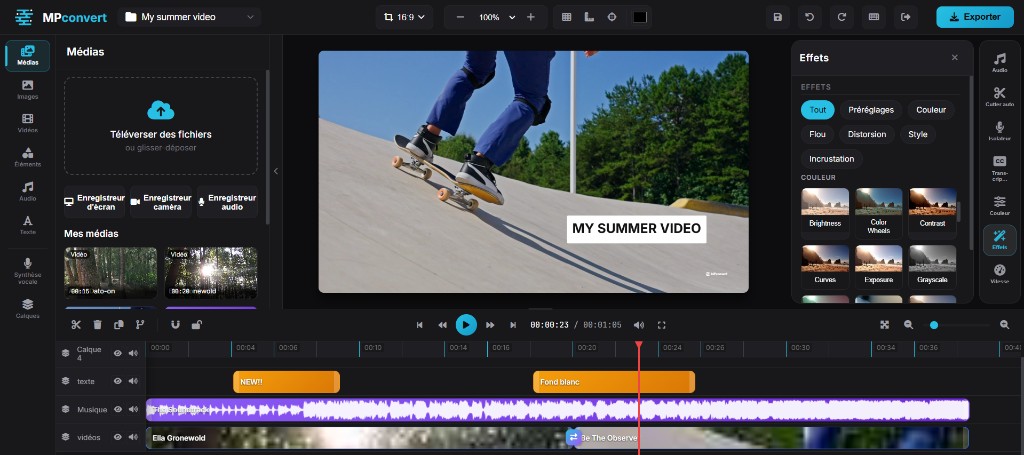
Inside the app
TIMELINE CUTTING
FRAME-ACCURATE EDITS
VIDEO · AUDIO · TEXT TIMELINE
ANIMATED TITLES
STICKERS & SHAPES
ROYALTY-FREE MEDIA
DRAG-AND-DROP IMPORT
BACKGROUND REMOVAL · AUTO CAPTIONS · AI VOICE
FADES & SLIDES
SMOOTH GPU RENDERING
FILTERS & COLOR GRADING
REAL-TIME GPU EFFECTS
AUDIO / VIDEO SPLITTER
VOICE ISOLATION
AUTO SILENCE CUTTER
Editing
Video, audio, and text tracks on an online timeline. Reorder layers, lock clips, and edit multi-track like a classic NLE.
Cut tool (C key) on the timeline — split clips at the playhead without leaving the online editor.
Basic, trending, and pro lower-thirds templates, plus motion presets you drop straight on the timeline.
Stickers, shapes, GIFs, and stock image/video libraries — drag elements onto your project from the Elements panel.
Fade, clock, blur, glitch, radial, and more — online transitions between clips with live loop preview.
Color grading and presets (mono, warm, cold, dramatic, vintage…) — real-time GPU video effects on your clips.
AI Studio
Use cases
Social media, training, or marketing — formats for every channel: vertical, square, or widescreen.
Shorts, Reels, and vertical formats — reframe, auto-caption, and export ready to publish.
9:16Screen recording, voice-over, and text chapters — ideal for step-by-step training videos.
16:9Short videos for landing pages, product demos, and internal content — MP4 export ready to share.
1:1 · 16:9Workflow
From import to final MP4 — 100% in-browser editing, nothing to install.
Drop local files or use the cloud library once signed in.
Cut on the timeline, add text, transitions, and effects. Preview updates live in the browser.
Pick MP4 or WebM and HD quality, start encoding, and download the final file.
Editor pricing
Start free with no credit card. Paid plans remove the watermark, add storage, and unlock HD export.
Free
No credit card · ideal to discover MPconvert
11 € / month
2 months free24 € / month
2 months free90 € / month
2 months freeFAQ
Answers to common questions before you open the editor.
Yes. MPconvert offers freemium access to the online video editor with no credit card. You edit in the browser with export up to 1080p; Starter unlocks 2K, Premium+ unlocks 4K, removable watermark, and more AI credits.
No. All video editing happens online with no app download. An account is recommended to save projects to the cloud, but you can open the editor and try it without signing up.
MP4 and WebM export, up to 1080p on Freemium. Starter allows export up to 2K; Premium and Pro up to 4K. Paid plans can turn off the watermark.
In AI Studio, run automatic transcription on your audio or video track. MPconvert generates synced captions you edit directly on the timeline.
Open background removal in AI Studio, select your clip, and run processing. The subject is cut out automatically, ready to composite on another background.
Recent Chrome and Edge offer the best online editing experience. Firefox and Safari may work with reduced capabilities depending on GPU effects used.
Free plan exports include an MPconvert watermark. Starter and above let you disable it at export.
They remain on the tools hub. This page focuses on the video editor; micro-tools handle one-off tasks without opening the timeline.
Full editing in the browser — open MPconvert in one click.
Launch editor